The speed of websites is no longer just a matter of convenience - it's a critical factor for business and SEO. One of the easiest ways to make your website faster is to optimise your images. And WebP format images are a huge improvement over traditional PNG and JPG formats.
But why exactly is WebP better and when should you use it?
1. Significantly smaller file size
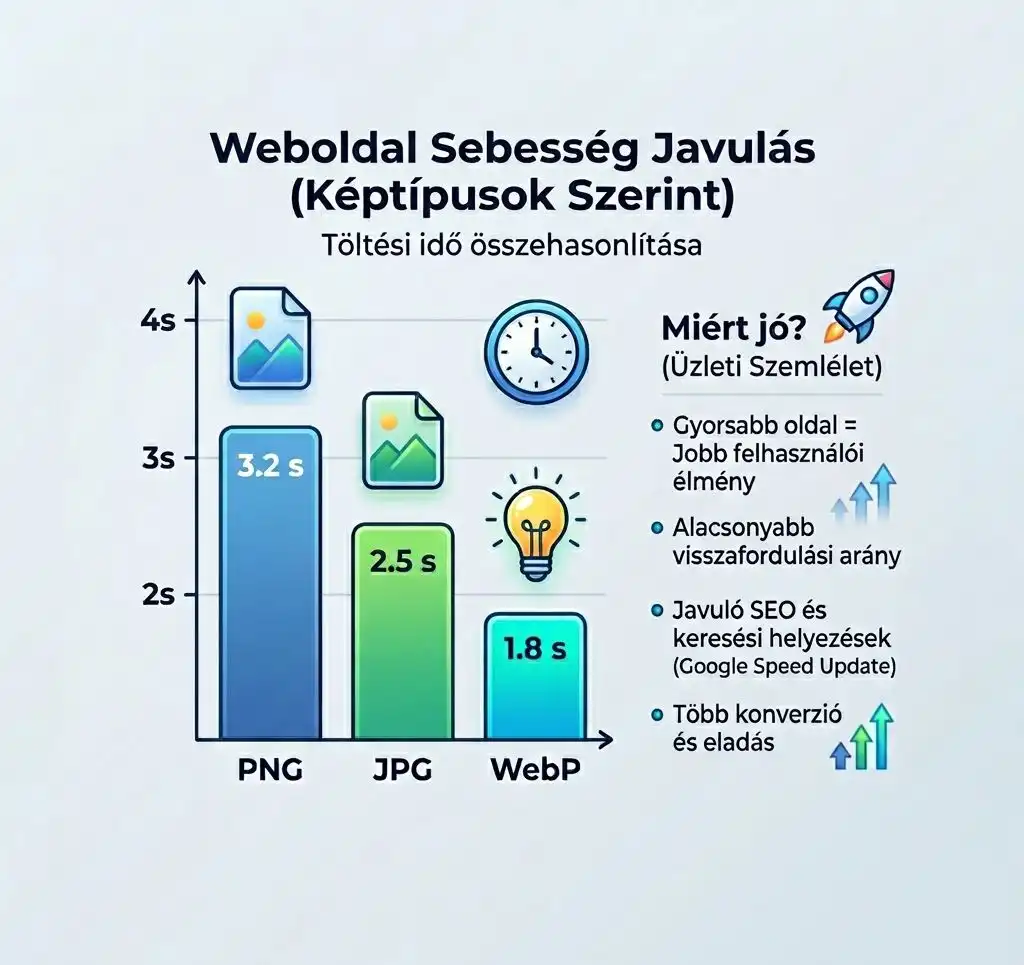
One of the biggest advantages of WebP is that it can store the same image in a much smaller format. A Compared to JPG up to 25-35% smaller file size, while Compared to PNG up to 50-80% the reduction. This means that the site will load faster, use less traffic and provide a better user experience. For a website with more images, this could mean more MB difference can also mean.
2. Faster loading = better SEO
Google officially takes website speed into account as a ranking factor. If you use WebP images, you'll see reduced load times, improved Core Web Vitals, and lower bounce rates. Overall, this can lead to better search engine rankings.
3. Balance between quality and size
WebP supports lossy compression (smaller size), or lossless compression (better quality). This means that you decide whether quality or fast loading is more important. It's important to know that in most cases a well-set WebP image without any visible deterioration in quality will be much smaller.
4. Easy conversion (even for free)
You don't need to be a graphic designer to switch to WebP. There are several free tools: online WebP converters, WordPress plugins, and image editors with export functions. These often have compression ratio, quality (e.g. 70-90%) and file size optimization settings, so you can easily find the ideal balance between between quality and speed.
5. Supported by modern browsers
The WebP format now works in almost all modern browsers (Chrome, Edge, Firefox, Safari), which means that the vast majority of your visitors will see your images without any problems.
When is WebP not ideal?
Although WebP is a very strong format, there are a few exceptions: if you need to support very old systems, if you need PNG for special graphics work (e.g. pixel point editing), or if it is not yet built into your workflow. But for an average business website, these are rarely a problem.
Summary
Using images in WebP format reduces the size of the website, speeds up loading, improves SEO and gives a better user experience. All this while maintaining almost the same image quality.
Want to optimise your website?
If you're not sure how to set up your images or want to get the most out of your website, sign up for a free consultation, and together we will look at where we can accelerate and improve results.